CLIENT IMAGE REVIEW PORTAL
REVIEW YOUR IMAGES, CHOOSE YOUR FAVORITES, AND EXPLORE RETOUCHING OPTIONS
How it Works
1) WHAT YOU’LL SEE IN YOUR PROOFS
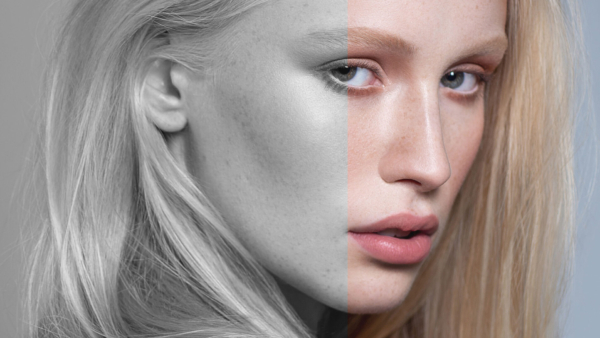
Color vs B/W
Occasionally the image will displayed in black and white. All black and white images can also be color.
Typically I decide when editing the image whether black and white or color works best.
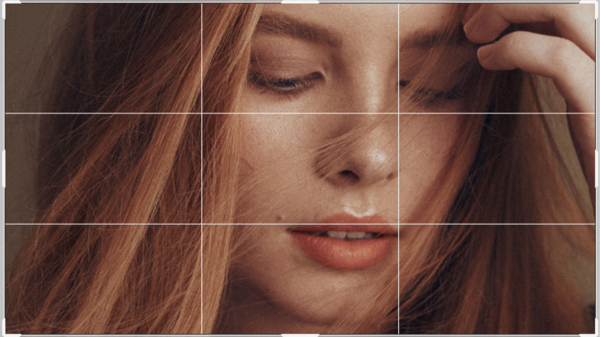
Cropping
Most often the images have not been cropped yet. If it is meant to be a headshot, you may see all the way down to your waist. The appropriate cropping will occur during the retouching/editing process.
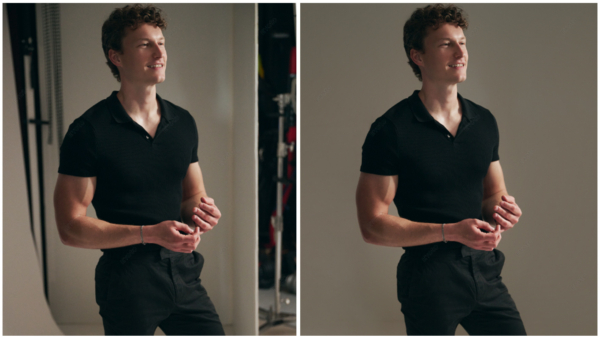
Extraneous Elements
Occasionally the image may be “zoomed out” resulting in seeing a light stand or background elements. Unless intentionally included, these elements will be removed during the retouching process and should not affect your selection.
2) HOW TO MAKE YOUR SELECTIONS
File Names
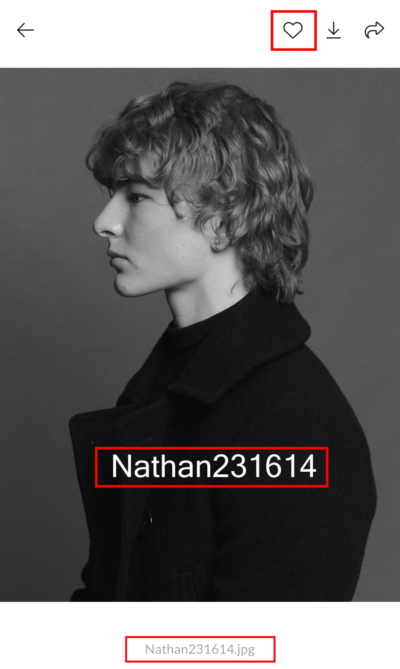
Please refer to each image only by its file name. The file name is embedded on every image as a watermark as well as below the image. Do not send screen shots of images.
Sharing Your Final List
You have two options for sharing your final selections:
1) The preferred option is to create a favorites folder within the preview gallery. To do so, simply click the “ ♥ “ icon on the image, and you will be prompted to enter your email address in order to save your favorites gallery. When you have completed your favorites gallery, you can email me to let me know.
OR
2) For the second option you may email a list of the image filenames you’d like retouched. Please include the entire file name for each image. For example, the image shown here has the file name “Nathan231614.jpg.” Listing only “1614” will not be accepted.
While the names may appear repetitive, the numbering eventually loops, which makes shortened versions confusing and unreliable.
Number of Selections
Ultimately, you want to select the final number of images based on the package you purchased. If you would like to upgrade your package, the options to do so are further down this page.
Sometimes, the task of selecting the final images on your own can be too overwhelming. In this case, you can make a shortlist of your favorites from which I can recommend the final selection. If making a shortlist, aim for 25 or so.
If you’re unsure which package you booked, send me a message and I can look it up for you.
3) PROCEED TO YOUR IMAGE REVIEW GALLERY
4) OPTIONAL PACKAGE UPGRADES AND RUSH DELIVERY
Oftentimes, there are simply too many good images to let go of, and clients opt to purchase additional retouched images.
The cost per image scales down as the quantity is increased.
Add Additional Retouched Images
TURNAROUND TIME
From the time you select your final images, the turnaround time to receive your final edits can be 2–3 weeks.
If you need them immediately, you can pay a $100 rush processing fee and have the retouched images delivered within 48 hours of your selection. Please let me know by email if you’d like to do so.
Please note, this is not always possible if I am traveling.
* When a client requests rush processing, I do not delay other clients who have not paid and are waiting for their images. I work overtime the day it is requested to complete both the rush request and the client already waiting, hence the additional cost. Thank you.